Live:Now in VS Code, Agent plugin in preview

The visual layer for machine learning

The model-first environment.

A model is a graph, not a text file. tensorViz holds the model, its code, its experiments and its compute in one live representation. You and your agents see it, query it and change it together.

Free · also on Open VSX

Illustration. Five dim fragments of one model drift apart around the words in your head: a model.py snippet, a print(model) dump, a loss chart, a checkpoints folder and an SSH terminal. Threads of light reel them into a single point. The lines of the print(model) dump lift off and become one node graph: Embedding, LayerNorm, Attention, MLP and Linear, with the attention node blocks.3.attn selected.

01The problem

Machine learning outgrew the text editor.

Today one model lives in five places: model.py, a print(model) dump, a tracker tab, a checkpoints/ folder and an SSH session. None of them knows about the others. Engineers stitch the model together in their heads.

02The representation

Everything about a model, attached to the model.

Its graph, its source, its runs and the machine it runs on, joined on every node. Code stays the source of truth, and the representation stays in sync with it.

blocks.3.attnOne node, seen through each layer

Model

Live

The computation graph: modules, operations, shapes and dtypes.

  • PyTorch · measured shapes
  • per-module latency on request
  • JAX and Flax · traced graphs

Code

Live

Every node tied to the exact line that defines it.

  • jump to source and back
  • graph edit → native diff
  • graph diff of Git changes and PRs

Experiments

Partial

The runs you keep and compare.

  • retained runs
  • run compare
  • decision record · planned

Compute

Partial

Where it runs and on what.

  • your machine
  • an SSH host
  • managed · planned

03See

Look inside the model, not across files.

One forward pass and a PyTorch model draws itself: modules, operations and measured shapes, with per-module latency when you ask for it. Every node is one click from the Python that defines it, and your cursor leads back to the node.

  • PyTorch · measured shapes
  • JAX and Flax · open as traced graphs

Illustration: a transformer block unfurls from its input as a graph of node cards, with tensor shapes ticking in along the edges, from [1, 128, 768] to [1, 128, 3072] and back. Selecting the attention node, blocks.3.attn, lights its exact line in model.py, line 18. A cursor on the mlp line in the code lights the MLP group in the graph.

04Change

Edit the graph. Ship the diff.

Change a parameter, swap an activation, add a layer or delete one on the graph, and tensorViz writes it as a native code diff that you apply or discard. Any Git change or GitHub pull request opens as a graph diff beside the code diff, without running either version.

Reviewers see what the model became, not just which lines moved.

Illustration: on the graph, the MLP’s GELU activation is replaced with SiLU from the node’s menu. The GELU node fades out in red, the SiLU node grows in green, and the edges downstream flash amber while their shapes hold at [1, 128, 3072] and [1, 128, 768]. Beside it, model.py shows the matching hunk, minus nn.GELU() and plus nn.SiLU(), with shapes unchanged and Apply and Discard. The same line changes all 12 blocks.

05Humans and agents

Agents now write model code. Give them the model, not the files.

They change it faster than anyone can read the diff, and they work from files and guesses. In tensorViz they work on the same representation you do: they call get_graph, inspect_nodes and compare_runs to read the model’s actual graph and shapes, and through the VS Code extension they call propose_edit. Every proposal comes back as a draft graph beside the code diff, and you accept or discard it.

One-click MCP setup for Claude Code, Codex and Cursor from the VS Code extension, and any MCP client by hand. Your agent brings its own model, so no tensorViz key is needed.

Add to your coding agent (preview)

Preview
claude plugin marketplace add tensorviz-org/tensorviz-plugins
claude plugin install tensorviz@tensorviz-standalone --scope user

Preview 0.3.33 · Claude Code, Codex, Cursor, T3 Code · Apple Silicon, CPython 3.12Preview: graphs, shapes and run compare. Edit proposals need the VS Code extension.

Illustration: two cursors, you and an agent, on the same graph. The agent’s tool calls stream in: get_graph, then inspect_nodes on blocks.3.attn, then propose_edit with 16 heads instead of 12. Within a second the proposal appears as a dashed amber draft beside the attention node, and model.py shows the matching diff, heads=12 to heads=16, with shapes unchanged and Accept and Discard. You accept, and the draft merges into the graph, the code and all 12 blocks.

06Today

Live today, where you already work.

The environment starts in three places: VS Code, your coding agent and the browser. Today it ships as a free VS Code extension, an agent plugin in preview and a Model Explorer you open with nothing to install.

Real capture of the tensorViz Canvas in the Model Explorer: the decoder block of TinyLlama, a reduced LLaMA-style model. Input feeds RMSNorm (block.attention_norm), then Attention (block.attention, selected, 32 layers inside), then an Add where the skip path from the input rejoins, then RMSNorm (block.ffn_norm), SwiGLU (block.ffn), a second Add and the output. Each module shows its recorded input and output shape, [1, 6, 16] float32.

FIG. 06Real capture · the extension's Canvas in the Model Explorer · TinyLlama decoder block

Open this graph in your browser

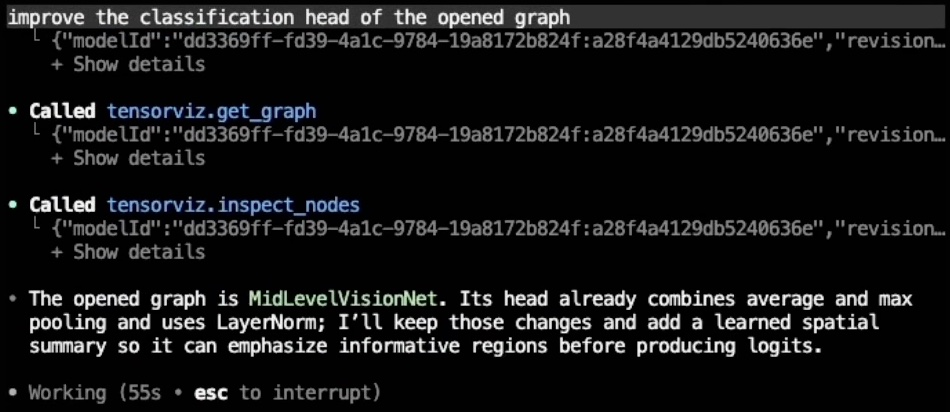
A real session: Codex reading the graph over MCP

Asked to improve the classification head of an opened vision model, Codex called tensorviz.get_graph and tensorviz.inspect_nodes before answering, then described the head it actually found.

  • tensorviz.get_graph
  • tensorviz.inspect_nodes
codex  session excerpttensorviz MCP
  1. Prompt: improve the classification head of the opened graph
  2. Called tensorviz.get_graph{ modelId: …, revision: … }
  3. Called tensorviz.inspect_nodes{ modelId: …, revision: … }
  4. Codex: The opened graph is MidLevelVisionNet. Its head already combines average and max pooling and uses LayerNorm; I’ll keep those changes and add a learned spatial summary so it can emphasize informative regions before producing logits.

FIG. 06bReal Codex session, typeset · tool payloads collapsed

Original screenshot

Release status

  1. EditorReleased

    tensorViz for VS Codeversion 0.1.13

    Free · Marketplace and Open VSX
    On your machine or over Remote SSH

    Install for VS Code
    • SeeYour PyTorch model as a graph with measured shapes, one click from its source.JAX and Flax as traced graphs · Hugging Face checkpoints browsed without downloading weights
    • ChangeEdit on the graph and get a native code diff to apply or discard.Change a parameter · add or delete a block
    • ReviewAny Git change or GitHub pull request opens as a graph diff beside the code diff.Share graphs as portable .tensorviz.json files
    • AgentsMCP for any MCP client, with one-click setup for Codex, Claude Code and Cursor.Canvas chat with Codex and Claude Code
  2. AgentPreview

    Agent pluginversion 0.3.33

    Claude Code · Codex · Cursor · T3 Code
    macOS Apple Silicon · CPython 3.12

    Add to your coding agent

    Runs inside your coding agent. No VS Code required.

  3. BrowserLive

    Model Explorer29 models

    tensorviz.dev/explore

    Explore 29 models

    The extension's Canvas in the browser, on 29 recorded models. Nothing to install.

Install

The extension is free. The agent plugin is a preview.

Setup guide

Released 0.1.13tensorViz for VS Code · free

Open in the Marketplace or from a terminal
code --install-extension tensorviz.tensorviz-vscode

Requires desktop VS Code 1.106+ and Python 3.10–3.14 with PyTorch. JAX and Flax graphs also open, with PyTorch installed.

07Where we're going

Open any model. Keep every reason.

Direction · not yet available

Next, the full environment. Open a model from where you found it, on GitHub or Hugging Face, and land in a working representation of it, in your browser or your editor. Run it on the compute it needs, and keep the reason behind every checkpoint: what it came from, what else was tried and why it was chosen.

The repository path github.com/your-lab/model opens as a small model graph: embed, a block repeated 12 times, ln_f and head, shown at checkpoint 12. Beneath it, the model's checkpoint lineage runs over 14 thousand training steps. Four sibling runs branch off, each with its reason. lr 3e-4: diverged at step 3.2k. Plus warmup 2k: stable, eval 2.98. Data mix v2: eval regressed. d_ff 4096: no gain over ckpt-07. One lit path runs through ckpt-03 and ckpt-07 to the chosen checkpoint, ckpt-12. Its record reads: from ckpt-07 with rmsnorm; tried lr, warmup, data and d_ff; why, lowest eval loss, 2.91; after, ckpt-14, an sft run.

FIG. 07A repo path, its graph, and the reason behind every checkpointIllustrative · direction

08Start

tensorViz

See the model. Change the model. Bring your agent.

Free for VS Code. One forward pass to your first graph.

Or explore 29 models in your browser